Collect Runtime Statistics with Accountant
The Accountant module can collect runtime statistics. It uses the observer pattern: once an Accountant is registered to an Algorithm, events reported by the Algorithm may handlers
This module is useful when the algorithm has a complicated .step(..). Otherwise, it is always possible to collect information by inspecting the Algorithm in between iterations.
Running this tutorial requires matplotlib.
Construct Algorithm
To begin, consider a simple GA with the following configuration:
Component |
Guide |
|---|---|
|
Binary string |
|
OneMax |
|
Elitist truncation |
|
Mutation |
Use a population size of 100 and individual size of 50 bits. EvoKit has all building blocks for this algorithm; for convenience, automate its creation with a function:
[1]:
from evokit.core import Population
from evokit.evolvables.algorithms import SimpleLinearAlgorithm
from evokit.evolvables.selectors import TruncationSelector, Elitist
from evokit.evolvables.binstring import BinaryString, CountBits, MutateBits

IND_SIZE: int = 50
POP_SIZE: int = 100
MUTATE_P: float = 0.01

def make_algo() -> SimpleLinearAlgorithm[BinaryString]:
    pop: Population[BinaryString] = Population(
        BinaryString.random(IND_SIZE) for _ in range(POP_SIZE))
    return SimpleLinearAlgorithm(population=pop,
                                 variator=MutateBits(MUTATE_P),
                                 evaluator=CountBits(),
                                 selector=Elitist(TruncationSelector(POP_SIZE)))
Because CanonicalGeneticAlgorithm has only one population, this attribute can be accessed as .population. Operators of this algorithm are not stateless and do not have much to offer in terms of analytics.
[2]:
import matplotlib.pyplot as plt
The Manual Approach
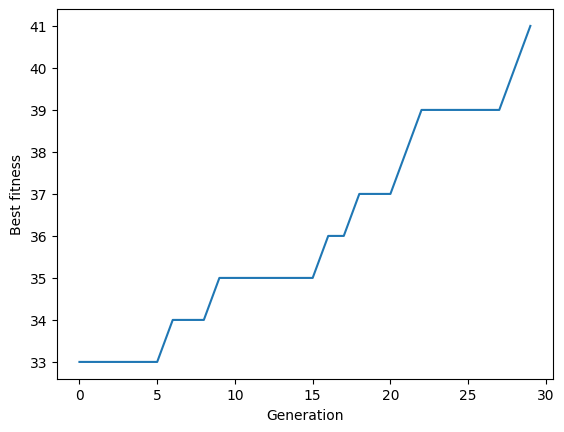
For a simple example, collect then plot the fitness curve by generation:
[3]:
STEP_COUNT: int = 30

algo = make_algo()
best_fitnesses: list[float] = []

for _ in range(STEP_COUNT):
    algo.step()
    best_fitnesses.append(algo.population.best().fitness[0])
[4]:
plt.plot(range(STEP_COUNT), best_fitnesses)  #type: ignore[reportUnknownMemberType]
plt.xlabel("Generation")  #type: ignore[reportUnknownMemberType]
plt.ylabel("Best fitness")  #type: ignore[reportUnknownMemberType]
[4]:
Text(0, 0.5, 'Best fitness')
Automating with Accountant
In accounting, the .Accountant module automates statistics collection. accounting.accountants provides several simple accountants for reference. In addition, accounting.visualisers offers a suite of utilities to plot collected data.
Instead of using a stock accountant, let’s build our own!
Inspecting Available Events
To create an accountant for an algorithm, it’s best to check what event the algorithm could report. An algorithm declares its standard events in .events. Furthermore, the base class Algorithm fires two events automatically: STEP_BEGIN before .step(..) and STEP_END after. These events are declared in .automatic_events.
Check which events the SimpleLinearAlgorithm could report:
[5]:
algo_2 = make_algo()
print(f"events: {algo_2.events}; automatic events: {algo_2.automatic_events}")
events: ['POST_VARIATION', 'POST_EVALUATION', 'POST_SELECTION']; automatic events: ['STEP_BEGIN', 'STEP_END']
Crafting an Accountant
An accountant must be created with accounting.Accountant. The constructor takes three parameters: (a) a list of events that can trigger collection, (b) a callable handler that collects data from the associated algorithm, and (c) an optional parameter that controls if the accountant should also watch_automatic_events.
For simplicity, declare an Accountant that collects the best fitness from a population only on automatic events. Observe the signature: the accountant collects…
… from a
HomogeneousAlgorithm(Algorithmwith one.population) ofBinaryStrings,a
tupleof onefloatthat contains a fitness value.
An algorithm can register several accountants, which are updated in order or registration. To check if the accountant is registered, check if it is in Algorithm.accountants.
[ ]:
from evokit.accounting import Accountant
from evokit.evolvables.algorithms import HomogeneousAlgorithm
[7]:
fit_acc = Accountant[HomogeneousAlgorithm[BinaryString], tuple[float, ...]](
    events=[],
    handler=lambda algo: algo.population.best().fitness,
    watch_automatic_events=True)

algo_2.register(fit_acc)
assert(fit_acc in algo_2.accountants)
To see how things work under the hood, fire an event in the algorithm, then check what the accountant has collected.
Each record contains four values: (a) the event that triggered collection, (b) the generation in which the event is fired, the time (via time.perf_timer, in seconds) at which the event in fired, and (d) the collected value.
Not all statistics are available at all times: for example, because the population starts off unevaluated, the best fitness is (nan,).
[8]:
algo_2.update(algo.automatic_events[0])
print(fit_acc.report())
[AccountantRecord(event='STEP_BEGIN', generation=0, value=(nan,), time=443313.1574931)]
Now, wipe all records from fit_acc and see how it collects statistics from a running algorithm. Then, visualise the results with a function from accounting.visualisers:
[9]:
fit_acc.purge()

for _ in range(STEP_COUNT):
    algo_2.step()
[10]:
from evokit.accounting.visualisers import plot

plot(fit_acc.report(),
     track_generation=True,
     use_line=True,)
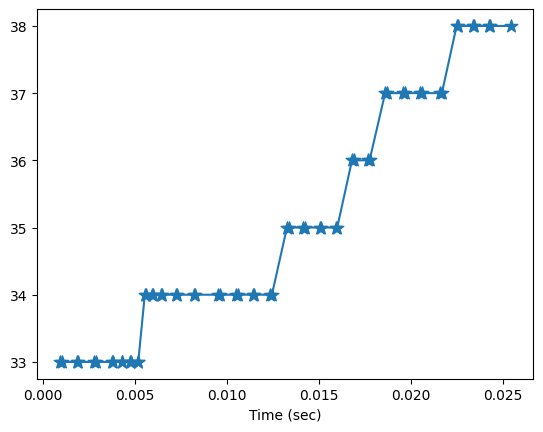
Notice that the visualiser highlights automatic events, which mark boundaries of generations. It also plots data points over runtime, which provides an intuitive view of training progression.