[1]:
%matplotlib inline
%config InlineBackend.figure_format='retina'

import omusic
import omusic.chord as chord
import omusic.modes as modes
Visualising Notes
OMusic comes with utilities that visualise notes on a fretboard. These can be found in omusic.guitar.
First, let’s draw an empty fretboard.
[2]:
import omusic.guitar as guitar
from omusic.guitar import draw_scale

draw_scale(omusic.NOTES, capo=0, width=13)
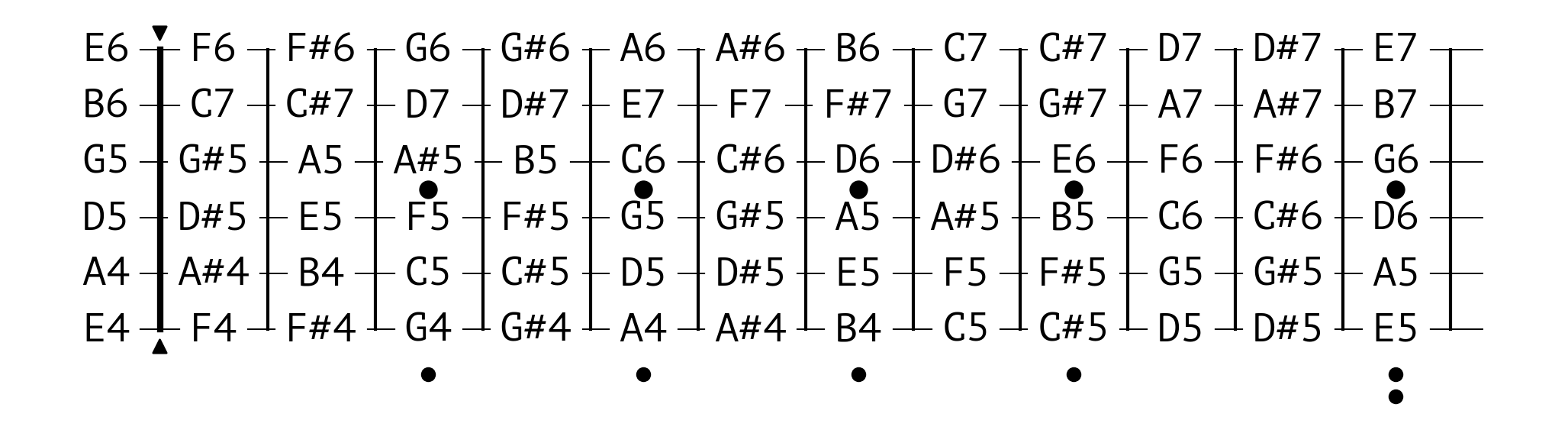
Let’s visualise some notes next. By default, the visualiser shows all notes in the same class – for example, drawing \(C_5\) draws \(C_4\) and \(C_6\) as well.
[3]:
draw_scale(chord.seventh("C5", modes.MAJOR_BLUES), 0, 20)

Try a blues triad next!
[4]:
draw_scale(chord.triad("C5", modes.MAJOR_BLUES), 0, 20)

Strict Mode
To only draw notes on specific octaves, use strict=True.
Up to the 12th fret, the guitar can play notes from E4 (52 in the MIDI standard) to E7 (88 in the MIDI standard), so let’s try the \(C_5\) major.
[5]:
draw_scale(chord.triad("C5", modes.MAJOR), 0, 19, strict=True)
